Installation and Operation Instructions
- Transfers calls in your home or office in a simple way.
- No more shouting. Just buzz...
- Connects to each one of your phones using existing
- Once you answer the phone, transferring the call is easy as can be, simply dial the code for your family member�s room and a beep from BuzzIt will signal him / her to pick up the phone.
- To transfer a call, dial the code (Prefix + Digit) of the desired extension. The other party hears the buzz, picks up the handset and comes on the line.
- You can dial several extensions one after the other.
- To call all extensions at the same time, dial Prefix, then 9 (for example * 9 or # 9).
- Check that the telephone is set to Tone dialing and not Pulse dialing.
- It is recommended to test the BuzzIt on a different phone line or at a different location.
- If the BuzzIt is defective return it to your dealer for replacement.
- Set the jumpers to match the code you selected for the particular BuzzIt.
- The telephone number this unit is connected to
- The ringer equivalence number (REN)
- The USOC jack required
- The FCC registration number
phone cords....Quick and simple...
|
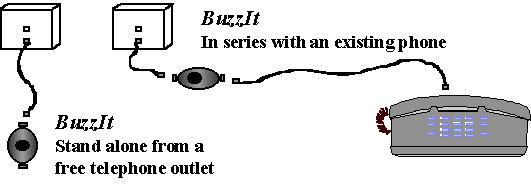
1. INSTALLATION Connections Connect your BuzzIt to the telephone line, as shown in figure 1. You can use the one-foot extension cable provided or any other length of standard telephone cable with RJ-11 connectors. Note: the connectors on the BuzzIt are identical; connections may be done to either one.
Figure 1. Possible installation of the BuzzIt Check-out After installation, check out the operation of your BuzzIt by dialing the code indicated on the label, from any phone, on the same line. To change the code, refer to paragraph 4, Code Reassignment. |
|
2. OPERATION |
|
3. TROUBLESHOOTING Testing 1. Install a BuzzIt as shown in figure 1. 2. Lift the hand-set at any phone on the same line and dial the code of this BuzzIt. 3. If the unit does not buzz, dial the �buzz all� code: * # 9. Once the unit responds to this code, it is OK. 4. Check the code setting according to the instructions in paragraph 4, Code Reassignment . Troubleshooting If the unit did not respond to the �buzz all� code, then: |
|
4. CODE REASSIGNMENT Code Definition The code is established by internal jumpers (see figure 2) and consists of: -A Prefix (#) or (* ) identified as A and -A digit, selected by you (Digit), identified as B. The Digit can be 1,2,3,............8. examples #1, * 2, * 7 etc.... Code Setup ( see figure 2) Note: It is recommended to assign codes, prepare and test the BuzzIts ahead of time. 1. Open the back cover. Look for the small rows of pins called Prefix and Digit as in figure 2. In figure 2, the Prefix is set for #, and Digit is set to 5 (code #5). Write your selected code on the sticker and place it on the BuzzIt. 3. Choose the buzzing mode using jumper Buzz Mode, identified as C. You can set the jumper for the Fast (F) or Slow (S) beeps. In figure 2, it is set for slow (S).
Figure 2. Bottom view with cover removed |
|
5. TECHNICAL SPECIFICATIONS * Model No.: BuzzIt BZ88i * Up to six BuzzIt units per phone line * Operates from the Line�s Power, no battery is needed * Code selected by internal jumper (16 combinations) * 2 buzz modes (fast, slow) * Size: 3 x 2 x 1 inch approx. * Weight: 2 ounces (50gm.) * Temperature: Operation: 0 degrees to 50 degrees C Storage: -20 degrees to +60 degrees C * Comes with two RJ11 sockets * Includes a one -foot extension cable * Complies with: -FCC Part 68 and -Industry Canada CS-03 |
|
6. FCC REQUIREMENT 1. The Federal Communication Commission (FCC) has established Rules which permit this device to be directly connected to the telephone network. Standardized jacks are used for these connections This equipment should not be used on party lines or coin lines. 2. If this device is malfunctioning, it may also be causing harm to the telephone network: this device should be disconnected until the source of the problem can be determined and until repair has been made. If this is not done the telephone company may temporarily disconnect service. 3. The telephone company may make changes in its technical operations and procedures: if such changes affect the compatibility or use of this device, the telephone company is required to give adequate notice of the changes. You will be advised of your right to file a complaint with the FCC. 4. If the telephone company requests information on what equipment is connected to their lines, inform them of: Items �b� and �d� are indicated on the label. The Ringer Equivalence Number (REN) is used to determine how many devices can be connected to the line. The sum of all such REN shall not exceed 5. |
|
7. LIMITED WARRANTY Shaf~Coms., Ltd. warrants this product to the original purchaser, against defects in material or workmanship as follows.WARRANTY PERIOD The BuzzIt which you have purchased, is warranted for a period of one year from date of original purchase. Shaf~Coms., will replace defective product with a new or remanufactured functionally equivalent product of equal value. WHAT WE WILL NOT COVER This Warranty will not apply if the unit has been previously altered, repaired, or serviced by anyone except by an authorized service facility: the serial number of the unit has been altered or removed; the unit has been subject to an accident, misuse or installed and operated contrary to the instructions contained in this leaflet. EXCEPT TO THE EXTENT PROHIBITED BY LAW, THIS SHALL BE THE EXCLUSIVE WRITTEN WARRANTY OF THE ORIGINAL PURCHASER AND NEITHER THIS WARRANTY NOR ANY OTHER WARRANTY, EXPRESSED OR IMPLIED, INCLUDING A WARRANTY OF MERCHANTABILITY, SHALL EXTEND BEYHOND SAID PERIOD. Shaf~Coms., SHALL NOT BE LIABLE FOR ANY LOSS OR DAMAGE, DIRECT OR CONSEQUENTIAL, ARISING OUT OF THE USE OF, OR INABILITY TO USE THIS PRODUCT. |